TradingView: Frequently Asked Questions
Published: Oct 17, 2022
Updated: May 23, 2025
Get answers to common questions about Questrade’s API integration with TradingView.

Maximize your Questrade account’s capabilities by linking it with TradingView, a globally renowned charting platform used by millions of traders.
Whether you're an aspiring investor, new trader, or an experienced professional, TradingView offers a comprehensive suite of tools (opens in a new tab) to enhance your trading experience.
In this article, we’ll cover common questions about TradingView and Questrade’s integration to help you easily get started.
What is TradingView?
TradingView is a leading charting platform known for its advanced tools, real-time market data, and vibrant community of over 60 million traders. It offers powerful charting capabilities, customizable indicators, and a wealth of market insights.

At Questrade, we wholeheartedly agree with TradingView’s core values (opens in a new tab), and believe that more informed investors make better traders - who in turn make better trading decisions.
Learn more about the capabilities of TradingView in our getting started article.
How do I get started with TradingView and Questrade?
Getting started couldn’t be easier. Link your accounts faster than you can make a cup of coffee, and supercharge your Questrade account with TradingView’s charting platform and tools.
Step 1: Create a TradingView profile
Visit the TradingView website (opens in a new tab)
Click on "Get started" and follow the prompts to create your profile
TradingView offers free and paid subscription tiers (opens in a new tab)
Step 2: Link your Questrade account
Log in to TradingView, and open a chart
Go to the Trading Panel tab and click on the Questrade logo
Follow the prompts to log into your Questrade account and complete the linking process
Tip: For more information about linking your account, explore our Getting started with TradingView article.
What can I trade on TradingView?
With your Questrade account linked, you can trade stocks and ETFs directly on the TradingView platform.
Short selling and borrowing on margin are also available if your Questrade account supports it.
Note: Other investments such as options, mutual funds, and precious metals may be viewable in the TradingView platform, but they are unavailable for trading or quoting through the API at this time.
How can I find Canadian companies to start investing in?
You can easily find Canadian companies in your TradingView to start investing in. Follow the steps below:
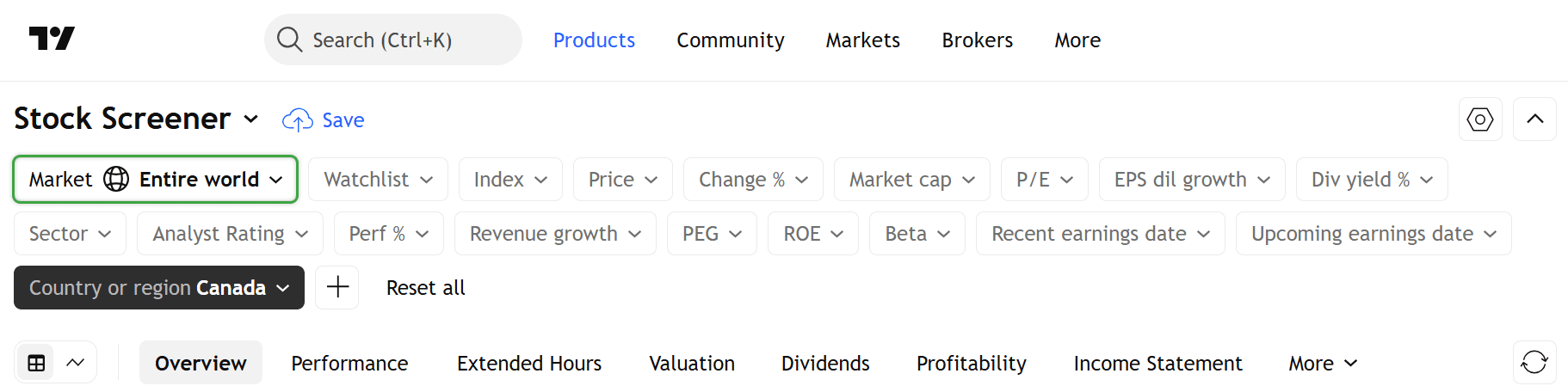
Log in to your TradingView account.
Go to the Products tab on the top navigation bar, and click Screeners.
On the Screeners page, click the Market tab and choose Entire world.
Add a filter. In your filter, click security info > Country or region of registration > Canada.
Is there a charge for using TradingView?
TradingView offers a free basic tier, as well as more advanced tiers for a monthly subscription. Learn more on the TradingView pricing page (opens in a new tab).
Connecting your Questrade account to TradingView through the API is also completely free to all Questrade customers.
Tip: Interested in trying out the more advanced features & packages available at TradingView? They offer a 30-day free trial for many of their plans if you want to go beyond the basic free plan.
How do I make deposits and withdrawals?
Deposits and withdrawals are managed through your Questrade account.
All balances will sync with TradingView after completing an account-related transfer, withdrawal or deposit.
Balances not syncing right away? Try logging into any Questrade platform while connected to TradingView and refresh your tab.
Learn more about transfers, deposits and withdrawals:
Can I use TradingView on mobile?
Yes, TradingView Mobile is now available to Questrade account holders through the API integration.
Learn more about and download TradingView Mobile on their website (opens in a new tab).
To connect your account, simply select Questrade from the broker portal within a chart.
Can I use TradingView’s desktop application?
Yes, the Questrade and TradingView API integration now supports TradingView Desktop (opens in a new tab).
Go further with multi-monitor support, workspace tabs, research tools, and an even deeper level of customization with TradingView Desktop, now integrated with your Questrade account(s).
How can I practice trading without risking real money?
TradingView offers paper trading features, allowing you to execute simulated trades without using any of your own funds.
Just open a TradingView chart, go to the Trading Panel, and select Paper Trading to get started.
Learn more about the Paper Trading features of TradingView in their article (opens in a new tab).
Can I trade options on TradingView?
At this time, TradingView does not support options trading directly on their platform(s).
If you have any option positions in your Questrade account, they will still be shown in your positions in TradingView, but they are not available to trade directly.
To trade options, please use any of the Questrade Edge platforms.
New: TradingView has just announced a new options tool currently available in Beta, designed to help you build option strategies. To learn more, please see their announcement here (opens in a new tab).
Options quotes, charts and trading, however, are only available in the Questrade Edge platforms.
How can I unlink my Questrade account?
You can easily unlink your Questrade account on the TradingView platform.
Open the Trading Panel on TradingView
Click on the Questrade logo
Select "Log out Questrade" at the bottom of the menu
You can also reconnect your account at any time in the future.
Can TradingView see my account details?
TradingView does not have access to, and does not store your personal login information like your username or password.
Account information about balances and positions is shared through a secure, encrypted API that does not share any of your sensitive information with third parties.
I need help with a TradingView feature
If you have any questions, or need assistance with any of their features, please visit TradingView’s help and support center (opens in a new tab) for comprehensive guides on everything TradingView.
My account was disconnected from TradingView
On occasion, due to network or internet connectivity issues, the connection between your Questrade account and TradingView may be interrupted.
This is due to the encryption required to maintain the secure connection between your accounts, and any pauses in connectivity may lead to a temporary disconnect.
If you experience this issue, just reconnect your Questrade account from the Trading Panel on TradingView in a few short clicks.
Note: You may also be disconnected when logging out of your Questrade web platform.
Tip: To ensure the best experience, particularly if you’re an active trader, please make sure you have a high-speed internet connection, and consider hardwiring your connection with ethernet if you’re far from your Wi-Fi signal.
What web browsers does TradingView support?
TradingView supports all modern web browsers, including Chrome, Safari, Firefox, Edge, Opera and more.
To ensure the best experience, we recommend upgrading your browser to the latest version for optimal performance, stability and security.
Can I have a Questrade platform open at the same time as TradingView?
Yes, you’re able to log into both the TradingView platform and any Questrade platform you want at the same time without any issues or restrictions.
This can be incredibly helpful for using some of Questrade’s research tools, or to monitor the markets and your positions at the same time across different platforms.
Additional Resources
For more help and information about TradingView’s products, plans, or features, please visit their
help and support center (opens in a new tab).
Ready to Revolutionize Your Trading Experience?
Open a Questrade account and link it to TradingView today to access advanced trading tools and real-time data.
The information displayed on the TradingView website does not constitute advice or a recommendation by Questrade and does not represent the view and opinions of Questrade. Questrade does not accept liability in connection with the TradingView website.
Questrade will not be held liable nor assume any liability for any loss or damages arising directly or indirectly from the use of these TradingView services, promotions or advertisements. Any liability, whether direct, indirect or consequential loss or damage is explicitly disclaimed.