RoundUP automatic savings program
Published: Oct 17, 2022
Updated: Oct 20, 2022
Learn more about the RoundUP automatic savings program and how it can help put your spare change to work.

Questrade’s RoundUP program puts your spare change to work, and helps make saving and investing easier.
Looking for an automatic solution to save a little more each month for your future?
You’ve come to the right place.
Link any eligible credit card and bank account to any of your Questrade accounts, and watch your savings grow automatically when your purchases are rounded up. That extra 10 cents here and 40 cents there can add up over time, and you can put your change to work in a Self-directed or Questwealth account.
How does it work?
You can link one Canadian Visa or Mastercard to any of your Questrade accounts, and the purchases you make throughout the month are rounded up to the nearest dollar.
The dollar value of the purchases made on your credit card will be tracked to calculate your RoundUP amount at the end of the month, then withdrawn automatically from the bank account of your choice at the start of the following month. (I.e. RoundUP amounts from November are deposited in the first week of December.)
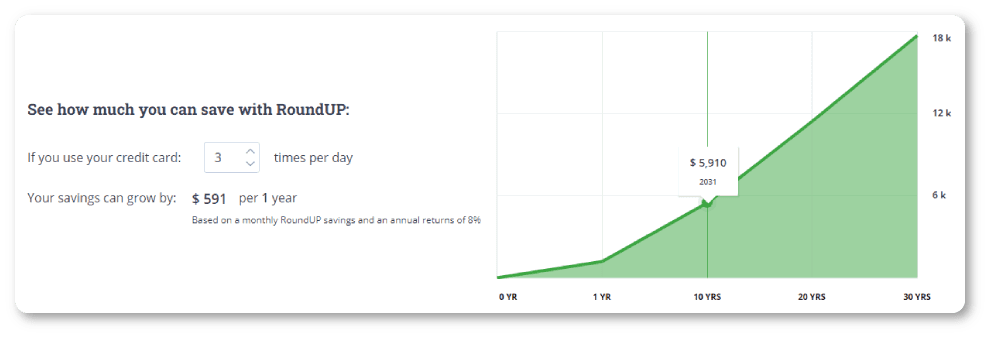
Note: The visual above is for informational and educational purposes only, and may not indicate real world RoundUP or market conditions. Depending on how often you use your card, the amount you spend, and what you’re invested in, your returns may vary.
When you enroll, you can set up your minimum and maximum monthly withdrawal amounts. The program minimum is only $10 (but you can set a higher minimum if you want), and the maximum is up to $2,000.
Please note: The RoundUP amount from your credit card purchases is not taken from the credit card, but rather from your bank account. The linked credit card is simply used to calculate the amount of the RoundUP.
Due to regulations in Canada, credit cards of any kind cannot be used for deposits into an investment account.
You can also pause the program at any time. Big holiday spending season coming up? No worries, check out the section below on editing your program enrollment for more information.
When you sign up for the RoundUP program, you can also enable Cashback Rewards from our retail partners.
Signing up
To sign up for the RoundUP program:
Head to the Rewards and referrals page on the left-side navigation menu.
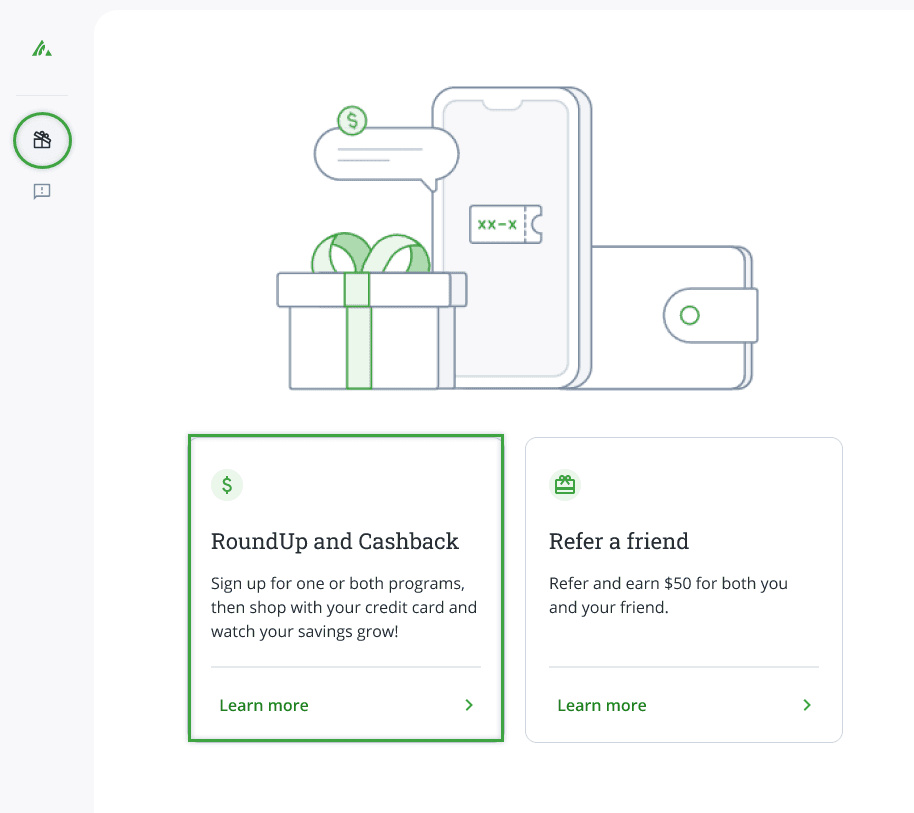
From here, click the green SIGN UP NOW button at the top of the page.
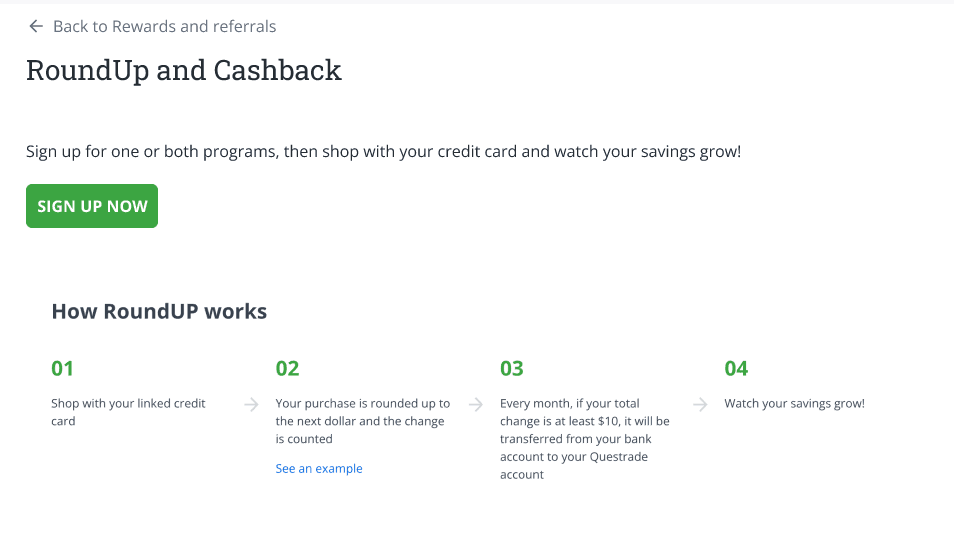
What you’ll need
Before you start, you’ll need your Canadian credit card and bank account information to complete your signup process.
The dollar value of the purchases made on your card will be tracked to calculate your RoundUP amount at the end of the month, and the designated bank account of your choice will be used for the deposit.
Adding your credit card
The first step is adding your credit card information to track your purchases and calculate your monthly savings.
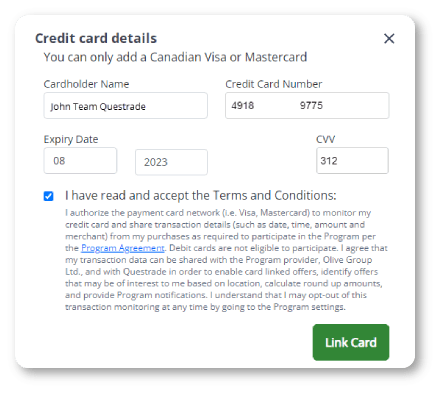
Please note: If you’re signing up for both RoundUP and Cashback Rewards, you will be able to add 2 credit cards. Only the first card can be used for the RoundUP program, but both cards can be used for the Cashback Rewards program.
Please enter the credit card number, expiry date, card holder name, and the CVV code (usually on the back).
Once you’re done, please read and accept the terms and conditions (opens in a new tab).
Adding your bank account
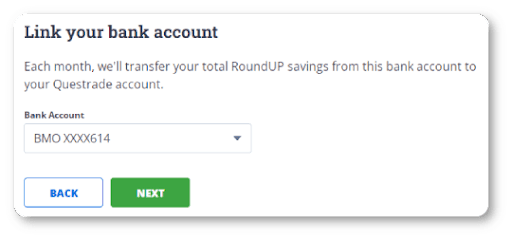
Adding your bank account for RoundUP is easy.
If you’ve already set up a Pre-Authorized Deposit (PAD), or an Electronic Fund Transfer (EFT) withdrawal in the past, your linked bank account(s) will be listed in the drop-down menu.
If you haven’t linked a bank account electronically yet, you’ll have the option to Add a new account. You can either connect through our secure online portal, or choose a manual set up.
Secure online connection
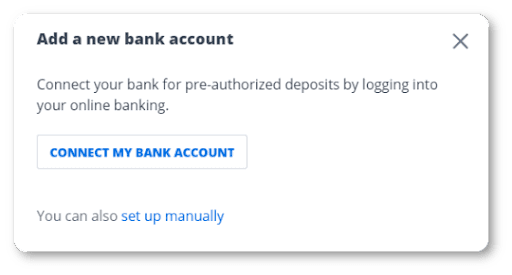
If you choose to add your bank account using your bank’s secured connection, you’ll be directed to a new screen to choose your institution.
Here, you’ll have to log in using your online banking login details.
Once completed, your bank account will be added to the signup process.
Manual connection
If you choose to add your bank manually, you have to complete the following:
Choose the type of account you wish to set up (personal, or corporate).
Enter the primary account holder information. Please ensure your bank account name matches the name on your Questrade account exactly.
Enter bank account information including:
Financial institution
Transit number
Bank account number
Currency used (CAD or USD) on that account
If you choose a manual setup, you will also need to upload a void check or direct deposit form to verify your bank account’s details.
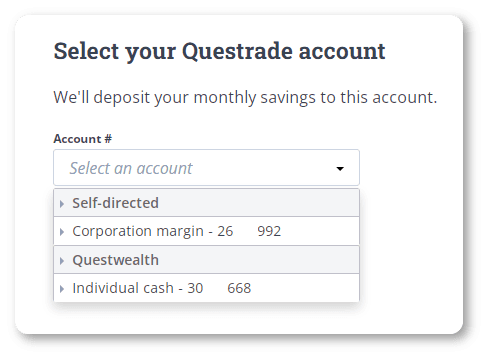
Next, choose the Questrade account you’d like your RoundUP savings to be paid out into.
Most self-directed and Questwealth accounts are supported with the exception of Retirement income (RIF, LIF...) and FX & CFD accounts, which are ineligible.
Please note: If you choose a registered account like a TFSA, FHSA, or RRSP for your RoundUP or CashBack rewards deposits, these will be counted as contributions for tax purposes.
RoundUP transfer limits
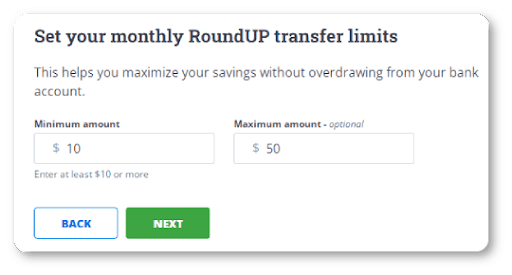
Enter your minimum amount: The minimum monthly amount is $10 CAD for you to enroll in the program, but you can also enter a higher amount if desired.
Enter your maximum amount. Even if your RoundUP purchases exceed this amount, your deposit will never be higher than your maximum.
Note: You can edit the minimum and maximum amounts anytime after you finish the set up from the program homepage. Check out the section below for more information about pausing or editing your program enrollment.
Agreements
The last step to finish your signup is to review and agree to the terms and conditions (opens in a new tab).
Congrats, you’ve finished signing up for RoundUP.