Watchlists
Published: Oct 17, 2022
Updated: Jul 22, 2024
Explore the powerful, user-friendly watchlists available on the Questrade Trading Platform.
The watchlists table is a useful tool that allows you to view stocks and ETFs you wish to buy in the future or keep an eye on.
Organize and plan your portfolio by creating one or multiple watchlists that align with your investment goals.
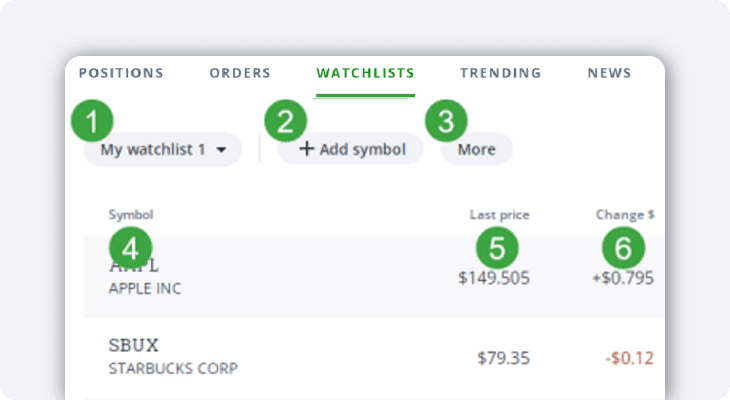
You can switch between viewing different watchlists using the menu here.
Add symbols to the watchlist you’re currently viewing.
The More button brings up a menu with options to create a new watchlist, or to re-name, organize, or delete this watchlist.
The Symbol column shows the symbol and description of the securities in this watchlist.
Last price shows the last traded price for this security.
The Change $ column shows the change in dollar amount since the previous closing price.
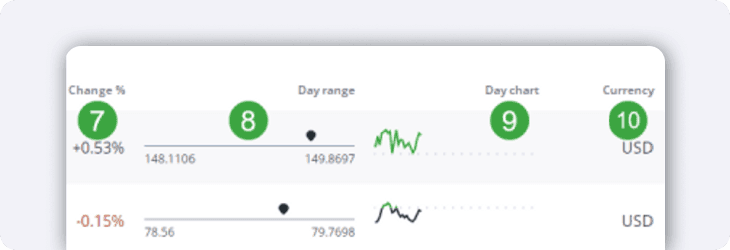
The Change % column shows the change in percentage since the previous close.
Day range is a useful tool that shows the day's lowest and highest trading prices, with an arrow indicating where the last traded price falls on that range.
The Day chart is a mini line chart showing how the security performed that day.
Lastly, the currency column shows what currency (CAD or USD) the security trades in.
Tip: If you click on any of the table headers (i.e. Symbol) you can reorganize the table to a custom view & order either ascending or descending.