Options levels
Published: Oct 17, 2022
Updated: Mar 26, 2026
Options levels can help you adjust your strategy based on your risk tolerance, available equity, and trading knowledge. Learn what options level mean, and how to use them.

Questrade has separated options trading into various levels increasing in risk and equity requirements based on guidance from our regulators.
These options levels ranging from 1 to 4 are designed to assist you with managing your account and trading activities based on your risk tolerance, and trading knowledge.
Here’s a high-level table of the option levels and the minimum equity required in your account to trade these strategies:
Option Level | Minimum equity required |
1. Long Calls and Puts | No minimum, signed options agreement required. |
2. Covered Calls and Puts, Cash-Secured Puts* | No minimum, signed options agreement required. |
3. Spreads | $5,000 CAD |
4. Uncovered (naked) Calls and Puts | $10,000 CAD |
Important to note: Registered accounts like an RRSP, TFSA, or FHSA can only be approved for up to Level 2 options trading due to industry regulations.
To trade level 3 and 4 options, a Margin account is required. Other limitations related to registered accounts are covered in more detail below.
*All Non-Registered and Registered Accounts (except RESP) with Level 2 options access are eligible to trade Cash-Secured Puts (CSPs). For Registered Accounts, please note that trading CSPs on indices (SPX, VIX, NDX, etc.) is prohibited.
Upgrading your options level
When you first create your Questrade account, you have the option to enable Level 1 options trading by clicking “yes” to trading options in the account application online.
If you didn’t enable options trading, or if you’d like to increase your option level, please follow these easy steps:
Log in to your account
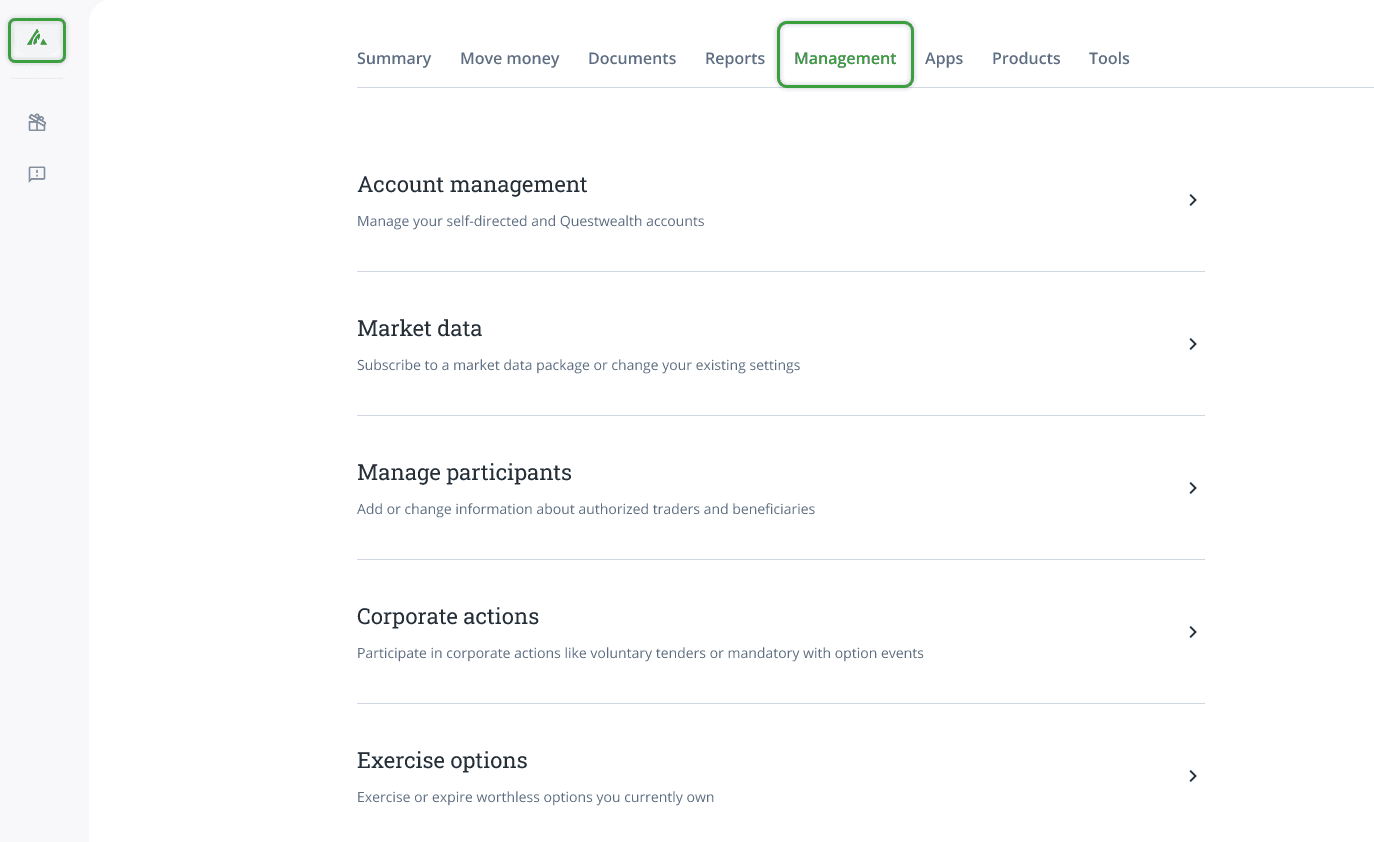
Go to the Management page, then click Account management.
Select the account that you’d like to modify
Please note: To enable options trading for multiple accounts, you will have to repeat this process for each account individually.
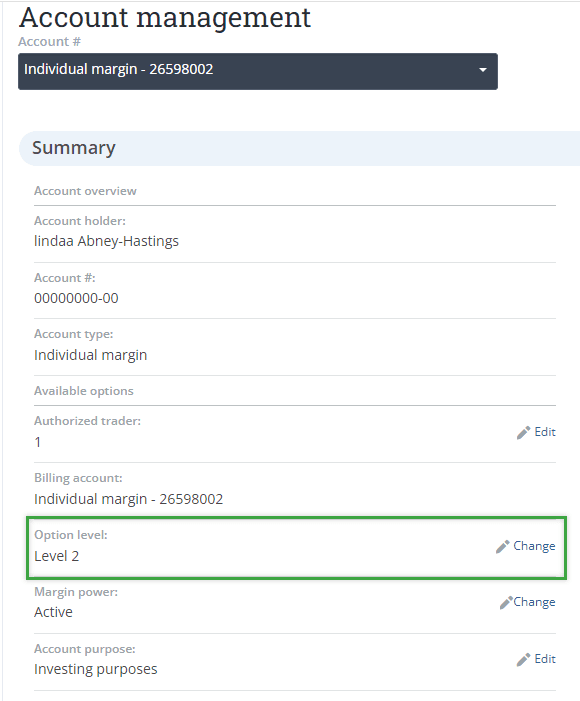
Click the Change button on the Options level bar.
On the next page, select the options level you wish to upgrade (or downgrade) to, and click the green Submit button
Download the Options Trading Agreement (opens in a new tab) form:
Fill out your account number at the top right
Enter your First and Last name (and joint account holder’s if applicable)
Check off the desired option level
Sign and date the bottom of the form (E-signatures accepted for non-joint accounts)
Upload the first page of the agreement from the Account Management menu under Upload documents
Processing time: 1-2 Business days. In most cases after you’ve submitted your request online, and uploaded your agreement, you will be able to trade options at the end of the next business day. You can check back on your Option level on the main Account Management (opens in a new tab) page.
Important to note: After you have submitted a signed Options Trading Agreement, you can modify or upgrade your options level for that specific account anytime from the Account management page as long as you meet the equity or account requirements. You do not need to re-submit the signed agreement.
Option strategies by level
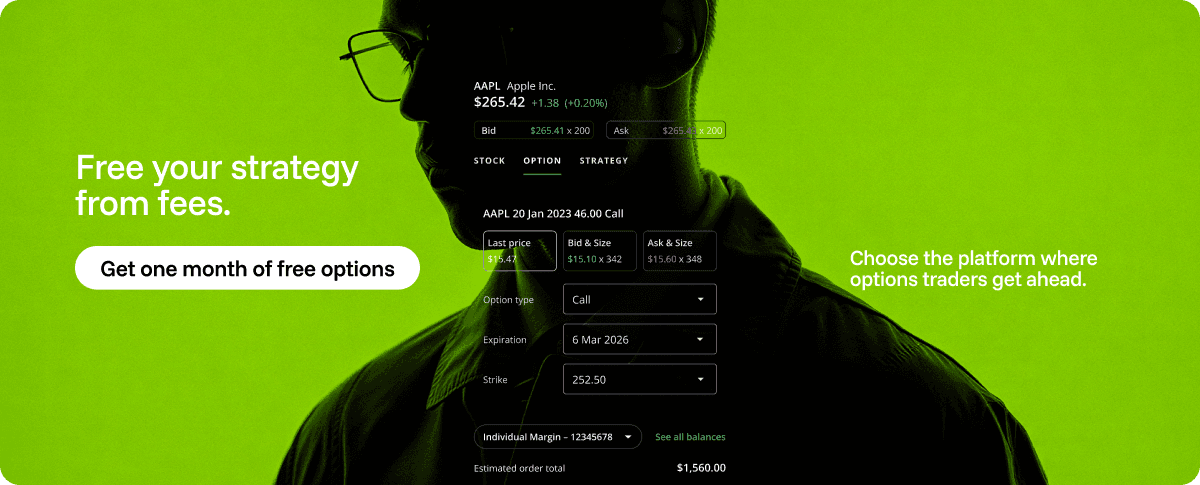
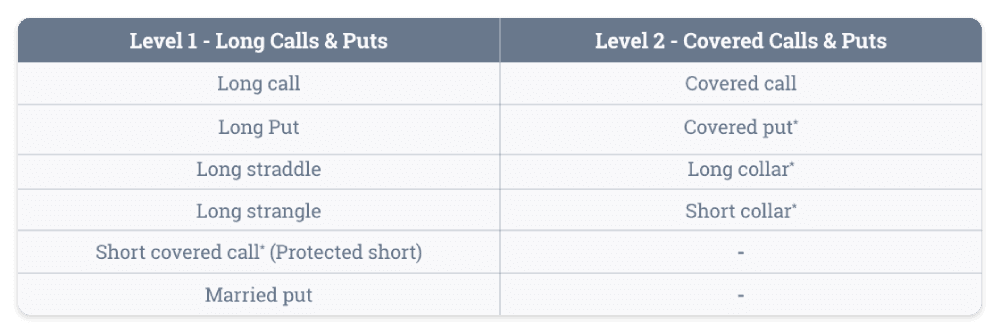
Check out the tables below to see how Option strategies are organized by level.
Certain strategies may be unavailable in registered accounts due to CRA rules preventing shorting or negative balances, and in Cash accounts, which which also do not allow shorting or borrowing money. These strategies are shown with an asterisk * in the table below.
Reminder: The following Level 3 and 4 strategies are only available in a Margin account that meets the equity requirements, and has upgraded the options level online.